Software for
mutual fund
distributors.

Your CAMS and KFintech feeds become one reconciled book overnight, so your morning is done before your first call — and your clients open their own portal in your firm's name.

Sample firm, made-up figures. Works the same for a one-person practice.

What slows most distributors down?

Not the advice. It is the hours around it — reconciling two RTA feeds, rebuilding the same statement, and answering questions a client could have answered themselves.

Two RTAs, one book

CAMS and KFintech arrive in different shapes, so the same client looks like two people until someone stitches them together.

The spreadsheet in the middle

Every valuation, gain figure and review pack passes through a workbook only one person in the office fully understands.

%

Statements on request

A client asks for last year's capital gains and it becomes an evening of exports, formatting and re-checking.

Families counted twice

Husband, wife and HUF sit in three folios with no household view, so nobody can answer what the family is really worth.

!

Errors found by the client

A missing folio or a stale NAV surfaces in a review meeting instead of on the day the feed broke.

?

Clients with no window in

Every balance check, every SIP question and every statement comes back to you as a WhatsApp message.

00:00While you sleep

Your registrar mail, read for you.

CAMS and KFintech mail you their files every night. IntelliWealthPro picks them up, checks them and turns them into client reports — nothing for you to download or upload.

Search mail

InboxTonight

  • CAMS Mailback01:52

    WBR2 transaction feed

    WBR2_03-11-2026.zipPicked up
  • KFintech Mailback01:24

    MFSD201 transaction feed

    MFSD201_03-11-2026.zipPicked up
  • Team calendar23:40

    Monday review moved to 11:00

  • Market weekly22:15

    This week in markets, in five minutes

IntelliWealthProSample

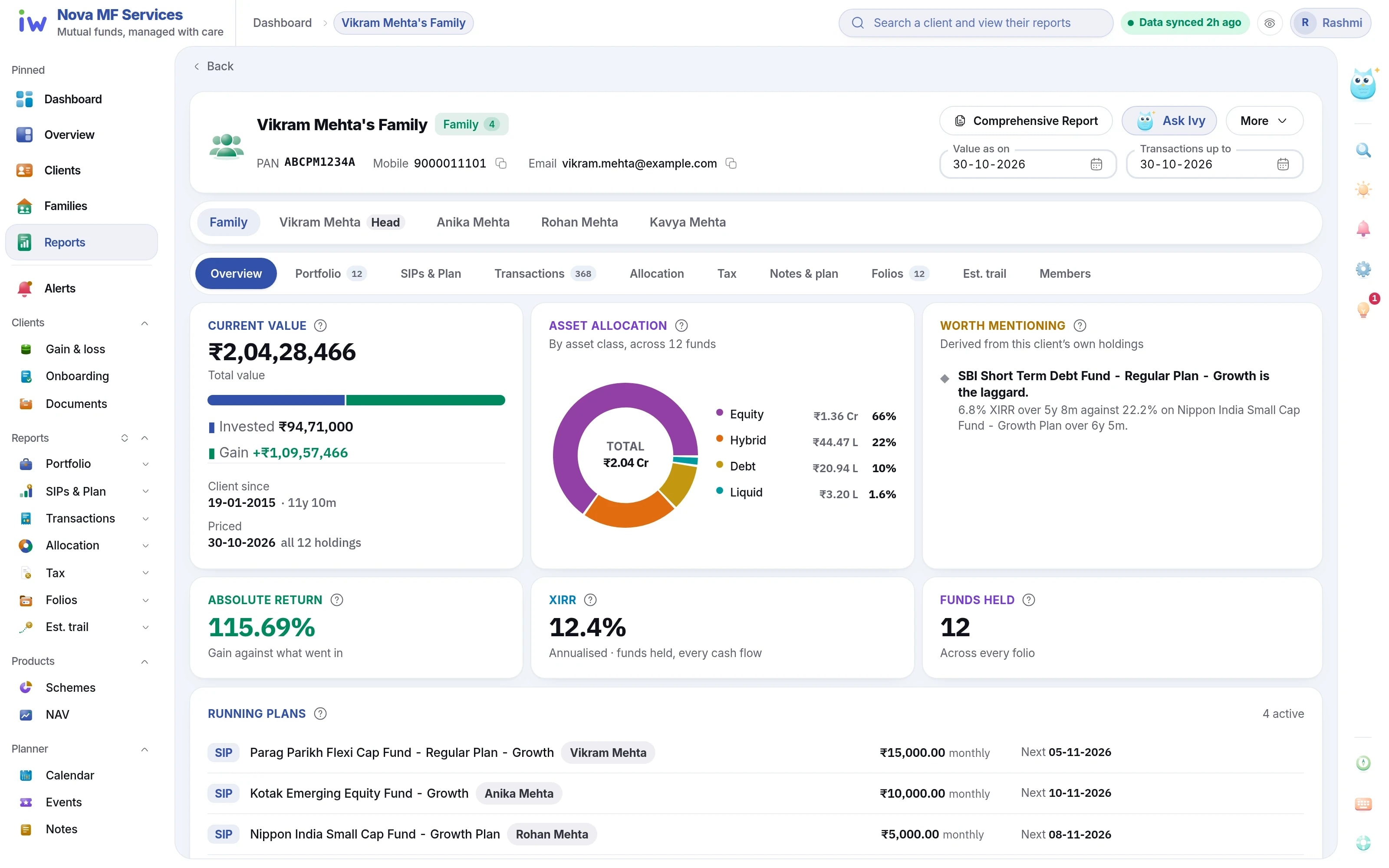
Vikram Mehta's Family

Portfolio valuation · as on 30-10-2026

Ready
Current value
₹2,04,28,466
Gain
₹1,09,57,466
XIRR
12.4%
  • Equity66%
  • Hybrid22%
  • Debt10%
  • Liquid2%
  • Flexi Cap FundVikram Mehta₹47,19,393
  • Emerging Equity FundAnika Mehta₹22,47,847
  • Equity Arbitrage FundKavya Mehta₹11,81,575
  • Small Cap FundRohan Mehta₹9,91,640

Invested ₹94,71,000From CAMS + KFintech · 05:30

  • Collected automatically every night
  • Both registrars, one book
  • No files to download or upload
  • Ready before your first call

08:00The dashboard

Open the day to who needs a call.

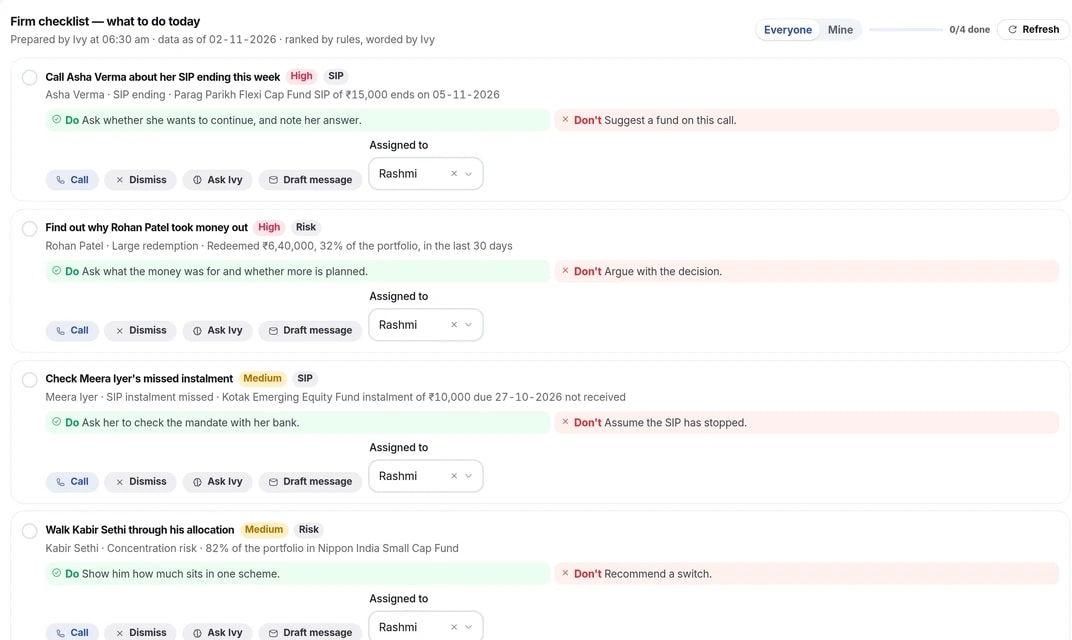
AUM, SIP book, new business and the clients who need a call — before the first coffee.

  • Risk alerts with the rule that fired
  • SIPs ending in 30 and 90 days
  • Acknowledge, resolve or dismiss as you call
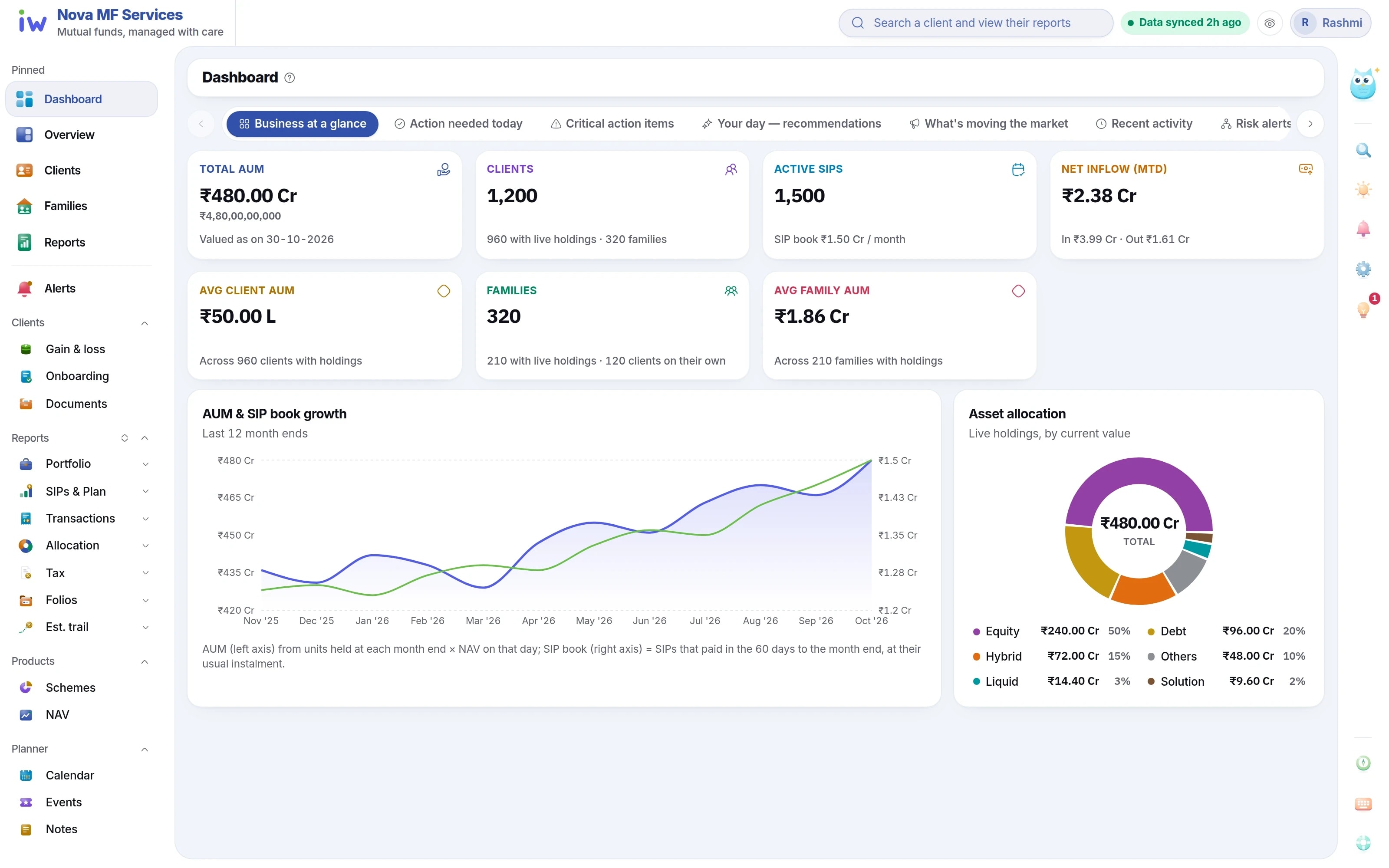
The distributor dashboard

Today's calls

  • SIP ending this weekAsha Verma
  • Large redemptionRohan Patel
  • Missed SIP instalmentMeera Iyer

09:00A client asks

A statement asked for, ready in one click.

Capital gains by financial year, short and long term already split — a branded PDF or Excel for one member or the whole family. Attach it to your reply, or the client downloads it from their own portal.

  • Any financial year or date range
  • For one client or a whole household
  • Your logo and colours on every page

Mehta family09:00

Can you send last year's capital gains? Our CA needs it.
Reports · Capital gains · FY 2025-26 Export PDF

Capital gains PDF, FY 2025-26, attached

  • Your firmPDF

    Realised capital gains

    FY 2025-26

    Short term
    ₹38,400
    Long term
    ₹2.6 L
    Page 1 of 4Download ↓

09:05Under your brand

They open it in a portal with your name on it.

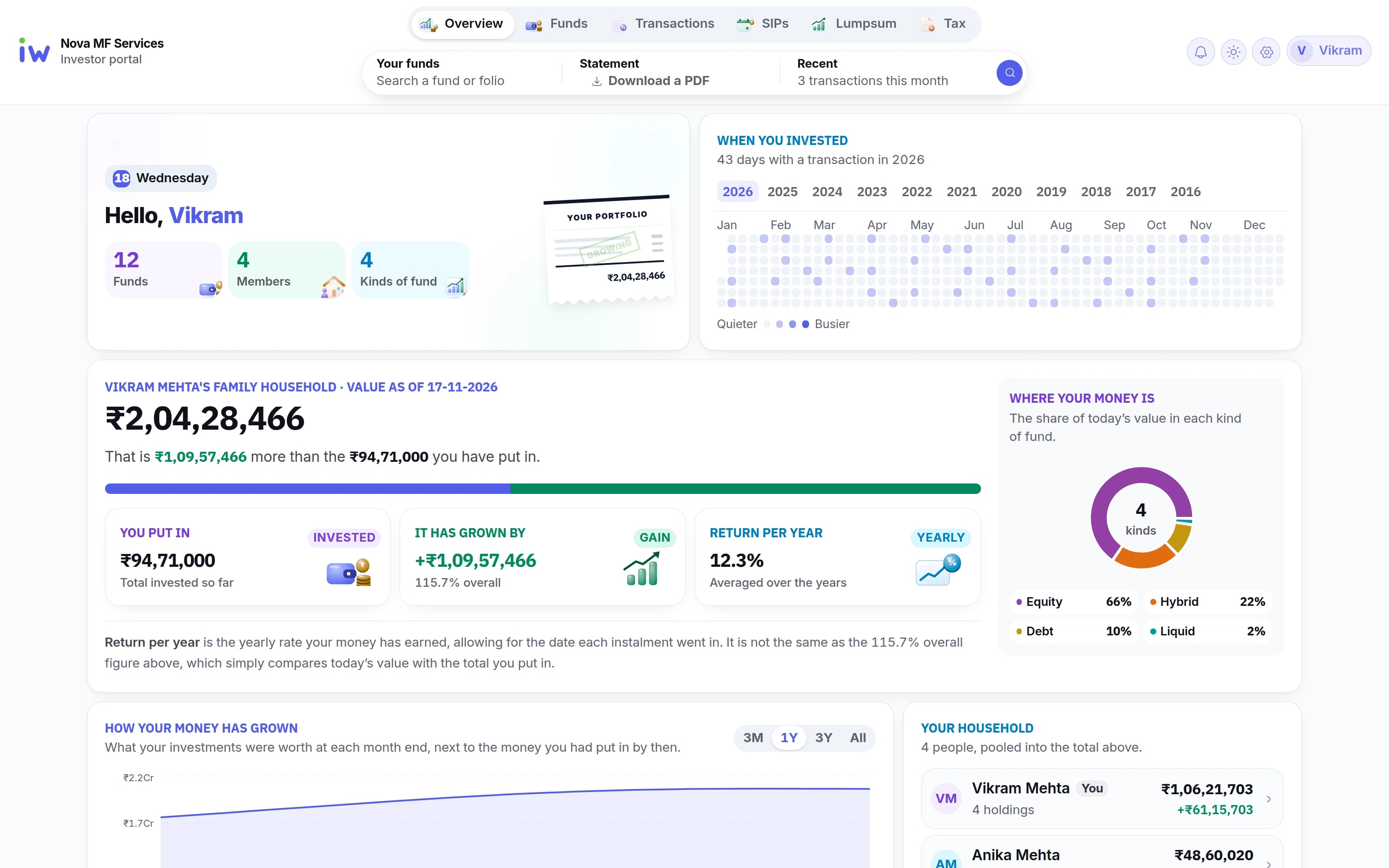
A web portal in your firm's name, logo and colours. Each client sees their own portfolio, SIPs, family holdings and capital gains, and downloads their statements — no app to install.

  • Refreshed every morning from the latest NAV
  • Works on a phone, in any browser
  • Invites sent from the MFD portal
  • Their whole portfolio
  • SIPs at a glance
  • Tax, ready to file
  • The whole family

Client portal

Your clients get a portal in your firm's name

Each family signs in and sees its own funds, SIPs and tax, under your firm's name and colours, on a laptop or a phone.

The household's value, what went in, the return per year and where the money is. Sample data

The client portal's overview for a sample family

Live in the product

Ask Ivy about your book.

Ivy is the assistant inside IntelliWealthPro. Ask in plain words — which SIPs end soon, what a family is worth — and get the answer from your own data, as a table or a chart.

  • Answers from your own reconciled book, with the figures.
  • Facts only — no recommendations, no buy or sell calls.
  • Your clients' identifiers never reach the AI.
Ivy
Answers from your book
Sample

Sample question: Which SIPs end in the next 30 days? Ivy: In the next 30 days, 6 SIPs end, ₹41,500 a month in all.

Try
Sample questions and figures. Ivy gives no investment advice.

Before

Four spreadsheets, added up by hand.

Their statements

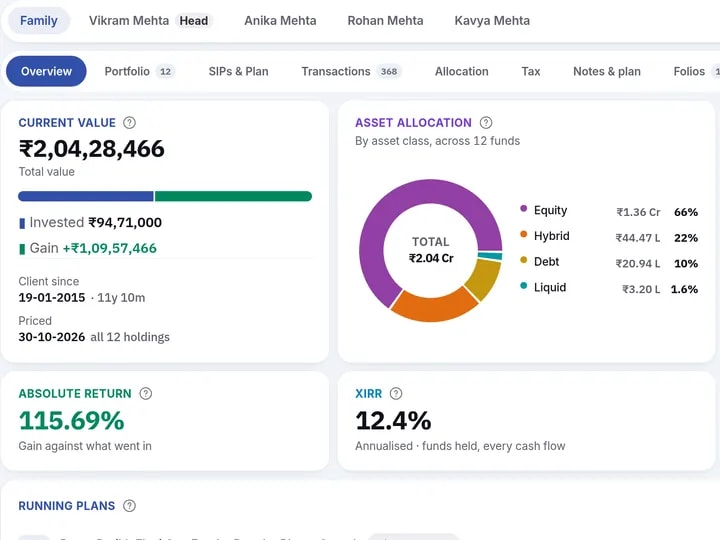
One report for the whole family.

Portfolio valuation, capital gains, transactions and SIPs — exported as a branded PDF or Excel.

  • Summary, detail and fund-wise
  • Any date range
  • PDF or Excel
Before: four separate spreadsheets, one per family member, to be added up by hand
A household's overview with the report catalogue
After · the family's report

Clients hear from you, on the day.

Birthday wishes, festival greetings and SIP reminders — set up once, then sent by email in your firm's name, on their own.

  • BirthdaysA wish on the day, every year.
  • FestivalsGreetings on the occasions you pick.
  • ₹SIPs endingA reminder before the last instalment.
  • ₹MilestonesThe anniversary of a first investment.
  • Your firm's name and colours on every message
  • A monthly sending allowance you can see
  • Clients left out when you say so
  • Every message sent, in one log

And everything around it.

01 / 03

Clients and families, in one place

Open a client or a family and land on their money, not a form. Husband, wife and HUF roll up into one household, so a family total is a click rather than a sum in your head.

Families that add up

Every member under one household, with each one's share of it.

Client master and Client 360

KYC, bank, nominee and contact details beside the portfolio they belong to.

Onboarding

New clients captured once and checked before they reach the book.

Documents

PAN, Aadhaar, bank proof and forms kept with the client, who can upload from their portal.

02 / 03

Your desk, every morning

The day's calls ranked and assigned before you sit down, and every SIP, redemption and tax question one click away.

?

Today's calls

SIPs ending, missed instalments and large redemptions, ranked and assigned to a person.

SIP, STP and SWP book

What is live, what lapsed this month, and what is due in the weeks ahead.

%

Capital gains and harvesting

Realised short and long term for any financial year, and what can be booked before 31 March.

Transactions and folios

Every purchase, redemption and switch, searchable by folio, fund or description.

03 / 03

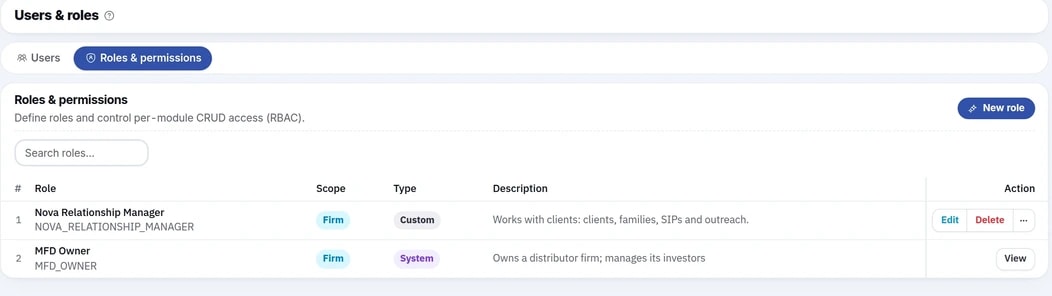
Your firm, run your way

Your team, your brand and your rules. Each person sees only what their job needs, and every change is on record.

Roles and permissions

Build roles from templates, so a relationship manager sees their clients and nothing more.

₹

White-label branding

Your firm's name, logo and colours on the client portal and on every report.

₹

Feed health

A broken or late registrar file is flagged on the day, not found in a review meeting.

Audit log

Every create, update and delete written down, with who made it and when.

Bring your existing data.

Your history comes in as files you already have — the RTA reports and your family groups. Upload them once; from then on the nightly feed keeps the book current.

  • Your RTA filesTransactions, SIP registrations, investor details and balances from CAMS and KFintech — ZIP, DBF, CSV or Excel, password-protected too.
  • Your family groupsThe group file from your current software, as Excel or CSV. You match its columns and check the doubtful rows; nothing changes until you apply.
  • Every file, loggedUploaded or mailed in, each file shows in the Import log with its rows and status. Then the nightly feed carries on.

Live in a week.

Onboarding is a checklist, not a project. You connect the feed and invite your team — we do the reconciling.

Go-Live Checklist

ARN & distributor verified
RTA feed credentials
Folios mapped (3,600)
Your team invited
GO-LIVE: DAY 7REF: #IW-ONBOARD

Day 1

•••

Connect your feed

Set up the mailback once. We collect from then on.

Days 2–3

Every folio mapped

Clients, families and folios matched into one book.

Day 4

Your team, your roles

Add your staff and give each person only what their job needs.

Day 7

Live

Your book, your reports and your clients' portal, switched on.

How is your clients' data protected?

Feed and mailbox passwords are stored encrypted. Each person sees only what their role allows, and every change is logged with who made it and when.

  • Feed passwords stored encrypted

    Your CAMS and KFintech file passwords and mailbox password are kept encrypted, never in plain text.

  • Roles and permissions

    Each person in your firm sees and does only what their role allows — you decide the roles.

  • Every change on record

    Every create, update and delete is written to an audit log, with who made it and when.

  • Identifiers kept from the AI

    PAN, email, phone and folio numbers are removed before anything is sent to the AI assistant.

Common questions.

What distributors ask before they sign up. Anything else, the guides go further.

Read the guides
  • Pricing depends on your firm — the size of your book, your team and what you switch on — so we quote it for you. Call our sales team on +91 98981 44084, or write to us from the Contact page, and we will come back with a price.

  • No. It works the same for a one-person practice with a few hundred families as for a firm with staff and several ARNs. The sample figures on this site are made up and happen to show a larger book.

  • Yes, as files. Upload your CAMS and KFintech files — transactions, SIP, STP and SWP registrations, investor details and balances — as ZIP (password-protected too), DBF, CSV, XLS or XLSX; if you are not sure which report a file is, it is read from the file itself. Your family groups come in from the group file of your current software, as Excel or CSV with one line per client, a group code and the client's name or PAN: you match its columns, check the doubtful rows, and nothing changes until you apply. Every file, uploaded or mailed in, shows in the Import log.

  • Request a demo, or register your firm directly. We verify your ARN, connect your CAMS and KFintech feeds and map every folio into one book. Then your reports and your clients' portal are switched on. The checklist runs over seven days: feed on day 1, folios by day 3, team on day 4, live on day 7.

  • No. It is software for distributors: it shows the facts of a portfolio — value, gains, SIPs, tax — and the recommendations stay with you. Ivy, the assistant, answers questions about your book and makes no buy or sell calls.

  • Yes. You can stop at any time under the terms of your plan, and ask for an export of your firm's data. After that it is deleted or anonymised, except what the law requires us to keep.

See it on a book like yours.

A walkthrough on a sample book like yours — the dashboard, the reports and the investor portal.